UMASK (User Mask or User file creation MASK) is the default permission or base permissions given when a new file (even folder too, as Linux treats everything as files) is created on a Linux machine. Most of the Linux distros give 022 (0022) as default UMASK. In other words, it is a system default permissions for newly created files/folders in the machine.
How to calculate UMASK in Linux?
Though umask value is the same for files and folders, but calculation of File base permissions and Directory base permissions are different.
The minimum and maximum UMASK value for a folder is 000 and 777
The minimum and maximum UMASK value for a file is 000 and 666
Why 666 is the maximum value for a file?
This is because only scripts and binaries should have execute permissions, normal and regular files should have just read and write permissions. Directories require execute permissions for viewing the contents in it, so they can have 777 as permissions.
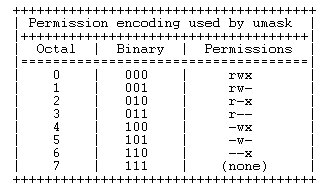
Below are the permissions and it’s values used by UMASK. If you are a Linux/Unix user you will observe these are inverse to actual permissions values when setting up permissions to files/folders with CHMOD command.
		0 --Full permissions (Read, Write, Execute)

		1 --Write and read

		2 --Read and execute

		3 --Read only

		4 --Write and execute

		5 --Write only

		6 --Execute onlyadminadmin

		7 --No permissions
How to remember these and calculate the file and folder permissions?
Consider above values are inverse to actual permissions. Suppose your UMASK value is 0027 (027).
For folder:
To calculate actual folder permissions from UMASK is done in two steps
Step1: Logical Negate the UMASK
Not (027) = 750
Step2: Logical AND this number with 777
777 AND 750 = 750
So actual folder permissions is 750 when it’s created. Owner will get full permission, group gets execute and write permissions and others no permissions
In other words and simple way..
We have to subtract 027 from 777, then we will get the actual folder permissions.
777 - 027 = 750
which is nothing but full permissions for the owner, read and execute permissions for group and no permissions for others.
For files:
To get actual file permissions from UMASK is done in two steps
Step1: Logical Negate the UMASK
Not (027) = 750
Step2: Logical AND this number with 666
666 AND 750 = 640
For your understanding purpose we have calculated this below equation to get what actual AND operator do.
		110 + 111 = 110 (6)

		110 + 101 = 100 (4)

		110 + 000 = 000 (0)
How to see default UMASK?
just type umask and you will get the default UMASK
umask
Output
0022
Some FAQ related to umask:
1) How to set or change default UMASK for all the new users?
The UMASK value can be set in /etc/profile for all the new users. Open this file as root user and write below line in the file.
umask 027
2) How to set or change default UMASK for existing users?
For existing users you can edit ~/.bashrc file in their home directory. This should be done for all the users one by one or if a machine is having a a lot of users, then you have to write a shell script for this.
3) I see people are using 0022 and 022 as UMASK, is there any difference between them?
There is no difference between these two, both indicates one and the same. The preceding 0 indicates there is no SUID/SGID/Sticky bit information set.
4) What is the preferred UMASK value for a system for Security reasons?
Preferred is 027 (0027) for security reasons because this will restrict others not to read/write/execute that file/folder
5) I see umask value as 022 in my vsftpd config file? What actually this mean to world?
When you see 022 as umask value in vsftpd config file that indicates that users who are going to create files will get 644 and for folders it’s 755 respectively.
To know more about umask refer man pages and info pages.
man umask
info umask
Please comment at comments section for any queries related to umask.


Latest posts by Surendra Anne (see all)
- Docker: How to copy files to/from docker container - June 30, 2020
- Anisble: ERROR! unexpected parameter type in action:
Fix - June 29, 2020 - FREE: JOIN OUR DEVOPS TELEGRAM GROUPS - August 2, 2019
- Review: Whizlabs Practice Tests for AWS Certified Solutions Architect Professional (CSAP) - August 27, 2018
- How to use ohai/chef-shell to get node attributes - July 19, 2018