This is my first video with my voice(I do have many videos without audio till this point, have a look at our LINUXNIX youtube channel ). Please bear with my English as I am not a native speaker. Please feel free to comment on this which will improve our future videos and content. Here is the Video for you.
TOP COMMAND YOU TUBE VIDEO
Top command options:
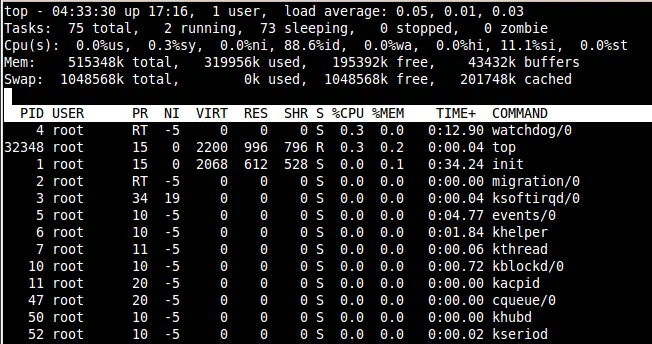
Line 1: Gives System present time, up time of the machine, number of users logged in, Load average on system at 1, 5, 15 min interval. Please ignore the values which I mention in the video, which mention load average as 5,10 and 15mins.
Line 2: Gives total number of process on the machine, number of running process, number of sleeping process, number of stopped process, number of Zombie process.
Line 3: Gives you CPU details
Line 4 & 5: Gives RAM and SWAP details.
Line 6: To execute top command shortcuts(See below for the list of top command shortcuts ).
From Line 7: dynamically displayed top process results.
Top commands shortcuts:
Note: Press below shortcuts at the time of running top command.
l –To display or to hide load average line
t –To display or to hide task/cpu line
1 –To display or hide all other CPU’s
m –to display or to hide RAM and SWAP details
s –To change the time interval for updating top results(value is in sec’s)
R –To sort by PID number
u — Press u then username to get only that user process details
P –To sort by CPU utilization
M –To sort by RAM utilization
c –To display or hide command full path
r –To renice a process, press r then the PID no then the renice value to renice a process.
k –To kill a process, press k then PID number then enter to kill a process
w –To save the modified configuration permanently.
q –To quit the top command.
h –for getting help on top command
Please share your thoughts about this video at the comments section.


Latest posts by Surendra Anne (see all)
- Docker: How to copy files to/from docker container - June 30, 2020
- Anisble: ERROR! unexpected parameter type in action:
Fix - June 29, 2020 - FREE: JOIN OUR DEVOPS TELEGRAM GROUPS - August 2, 2019
- Review: Whizlabs Practice Tests for AWS Certified Solutions Architect Professional (CSAP) - August 27, 2018
- How to use ohai/chef-shell to get node attributes - July 19, 2018