
There are some other special permission apart from the normal file permissions read, write and execute which we set with chmod and chown commands. They are SUID, SGID, Sticky Bit, ACL’s, SUDO, SELinux for granular file/folder management by Linux administrator. Today we will see
1) What is SUID?
2) How to set SUID?
3) Where to use SUID?
What is SUID and how to set it in Linux?
SUID (Set owner User ID up on execution) is a special type of file permissions given to a file. Normally in Linux/Unix when a program runs, it inherit’s access permissions from the logged in user. SUID is defined as giving temporary permissions to a user to run a program/file with the permissions of the file owner rather that the user who runs it. In simple words users will get file owner’s permissions as well as owner UID and GID when executing a file/program/command.
The above sentence is a tricky one and should be explained in-depth with examples.
Learn SUID with examples:
Example1: passwd command
When we try to change our password we will use passwd command, which is owned by root. This passwd command file will try to edit some system config files such as /etc/passwd, /etc/shadow etc when we try to change our password. Some of these files cannot be opened or viewed by normal user only root user will have permissions. So if we try to remove SUID and give full permissions to this passwd command file it cannot open other files such as /etc/shadow file to update the changes and we will get permission denied error or some other error when tried to execute passwd command. So passwd command is set with SUID to give root user permissions to normal user so that it can update /etc/shadow and other files.
Example2: ping command
Similarly if we take ping command, when we have to execute this command internally it should open socket files and open ports in order to send IP packets and receive IP packets to remote server. Normal users don’t have permissions to open socket files and open ports. So SUID bit is set on this file/command so that whoever executes this will get owner (Root user’s) permissions to them when executing this command. So when this command start executing it will inherit root user permissions to this normal user and opens require socket files and ports.
Example3: crontab and at command
When scheduling the jobs by using crontab or at command it is obvious to edit some of the crontab related configuration files located in /etc which are not writable for normal users. So crontab/at commands are set with SUID in-order to write some data.
How can I setup SUID for a file?
SUID can be set in two ways
1) Symbolic way (s, Stands for Set)
2) Numerical/octal way (4)
Use chmod command to set SUID on file: file1.txt
Symbolic way:
chmod u+s file1.txt
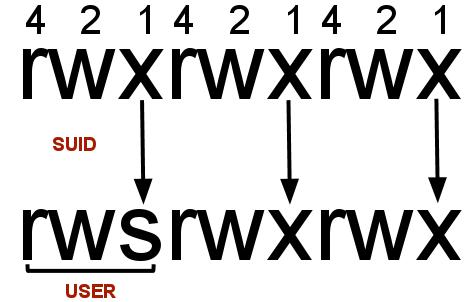
Here owner permission execute bit is set to SUID with +s
Numerical way:
chmod 4750 file1.txt
Here in 4750, four indicates SUID bit set, seven for full permissions for owner, five for read and execute permissions for group, and no permissions for others.
How can I check if a file is set with SUID bit or not?
Use ls –l to check if the x in owner permissions field is replaced by s or S
For example: Listing file1.txt before and after SUID set
Before setting SUID bit:
ls -l
total 8
-rwxr--r-- 1 xyz xyzgroup 148 Dec 22 03:46 file1.txt
After setting SUID bit:
ls -l
total 8
-rwsr--r-- 1 xyz xyzgroup 148 Dec 22 03:46 file1.txt
Some FAQ’s related to SUID:
A) Where is SUID used?
1) Where root login is required to execute some commands/programs/scripts.
2) Where you don’t want to give credentials of a particular user, but want to run some programs as the owner.
3) Where you don’t want to use SUDO command, but want to give execute permission for a file/script etc.
B) I am seeing ‘S’ I.e. Capital ‘s’ in the file permissions, what is that?
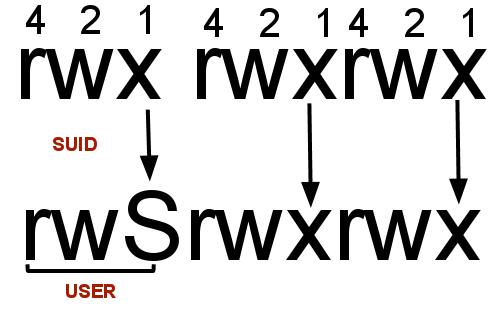
After setting SUID to a file/folder if you see ‘S’ in the file permission area that indicates that the file/folder does not have executable permissions for that user on that particular file/folder.
For example see below example
chmod u+s file1.txt
ls -l
-rwSrwxr-x 1 surendra surendra 0 Dec 27 11:24 file1.txt
If you want to convert this S to s then add executable permissions to this file as show below
chmod u+x file1.txt
ls -l
-rwsrwxr-x 1 surendra surendra 0 Dec 5 11:24 file1.txt
you should see a smaller ‘s’ in the executable permission position now.
SUID with execute permissions:
SUID without execute permissions:
C) How can I find all the SUID set files in Linux/Unix.
find / -perm +4000
The above find command will check all the files which are set with SUID bit (4000).
D) Can I set SUID for folders?
Yes, you can if it’s required (you should remember one thing that Linux treats everything as a file)
E) What is SUID numerical value?
It has the value 4.
Please comment your thoughts about SUID usage in your company.


Latest posts by Surendra Anne (see all)
- Docker: How to copy files to/from docker container - June 30, 2020
- Anisble: ERROR! unexpected parameter type in action:
Fix - June 29, 2020 - FREE: JOIN OUR DEVOPS TELEGRAM GROUPS - August 2, 2019
- Review: Whizlabs Practice Tests for AWS Certified Solutions Architect Professional (CSAP) - August 27, 2018
- How to use ohai/chef-shell to get node attributes - July 19, 2018


